- Welcome to Composers Desktop Project Forum.

News:
Release 8 is now available:
https://unstablesound.net/cdpforum/index.php?topic=264.0
Recent posts
#1
General Board / Re: New node based UI for CDP ...
Last post by twinkle-bone - August 18, 2026, 02:37:18 AMhello everyone
I have been using this and find it very useful - is there any word on an update ? not all of the CDP functions are recreated as nodes / processes.
thank you for building this
I have been using this and find it very useful - is there any word on an update ? not all of the CDP functions are recreated as nodes / processes.
thank you for building this
#2
General Board / Re: Problems with MOVE formant...
Last post by Phoenix cat - July 20, 2026, 08:59:14 PMThanks, the Terminal says that "xattr" does not means nothing but I tried in Soundloom and Soundshaper, and the problem is solved. So it works.
#3
General Board / Re: Problems with MOVE formant...
Last post by simonk - July 20, 2026, 08:16:04 PMWhen updating programs you'll probably have to run this again.
- from the Installation Notes
"Run Terminal (it starts in your home directory) and at the command prompt,
type (followed by pressing Enter; note the spaces):
xattr -rc cdpr8
(The -r flag signifies "recursive" - it will visit every file and folder inside cdpr8,
releasing, so to speak, all executable files and apps from Quarantine.) "
Simon
- from the Installation Notes
"Run Terminal (it starts in your home directory) and at the command prompt,
type (followed by pressing Enter; note the spaces):
xattr -rc cdpr8
(The -r flag signifies "recursive" - it will visit every file and folder inside cdpr8,
releasing, so to speak, all executable files and apps from Quarantine.) "
Simon
#4
General Board / Re: Problems with MOVE formant...
Last post by Phoenix cat - July 19, 2026, 10:22:25 PMI replaced the file specfnu.exe but when I try to do some process that involves this command, a DOS window appears and the Avast antivirus jumps and blocks it. I don't know what to do; is it secure? do I need to disable the antivirus? Thanks.
#5
General Board / Re: CDP WASM and the cdp-wasm-...
Last post by simonk - July 10, 2026, 06:16:37 PM"ps the capatcha on this forum is very difficult!"
Sorry about that, We've had significant amount of bad Actors, mostly Russian, getting signed up & posting junk. It's become considerably onerous & time consuming whilst trying to keep this an open space for CDP'ers.
Oh well....Onwards!
Sorry about that, We've had significant amount of bad Actors, mostly Russian, getting signed up & posting junk. It's become considerably onerous & time consuming whilst trying to keep this an open space for CDP'ers.
Oh well....Onwards!
#6
General Board / Re: CDP WASM and the cdp-wasm-...
Last post by olilarkin - July 10, 2026, 05:05:34 PMHello again,
I didn't submit the synthtopia article - i've asked them to take it down since my colleague who submitted it prematurely without asking me and didn't give the right details :sigh.
Losing work/not being able to save is annoying i agree - cdp-plugin fix is incoming.
Oli
ps the capatcha on this forum is very difficult!
I didn't submit the synthtopia article - i've asked them to take it down since my colleague who submitted it prematurely without asking me and didn't give the right details :sigh.
Losing work/not being able to save is annoying i agree - cdp-plugin fix is incoming.
Oli
ps the capatcha on this forum is very difficult!
#7
General Board / Re: CDP WASM and the cdp-wasm-...
Last post by simonk - July 10, 2026, 03:38:54 PMHi Oli,
Welcome to the CDP forum!
Continuing a small conversation the we began on the Sound on Sound forum.
If you could please firstly fix the saving problem with the stand alone & Vst version I personally would be more likely to spend more time spotting bugs.
I did generate some nice output sounds yesterday but was ~really~ frustrated to loose them....
Also you may not have noticed that there is a partial announcement on Synthtopia that you might like to follow up on.
https://www.synthtopia.com/content/2026/07/09/composers-desktop-project-cdp-features-hundreds-of-free-sound-design-tools/
Simon
Welcome to the CDP forum!
Continuing a small conversation the we began on the Sound on Sound forum.
If you could please firstly fix the saving problem with the stand alone & Vst version I personally would be more likely to spend more time spotting bugs.
I did generate some nice output sounds yesterday but was ~really~ frustrated to loose them....
Also you may not have noticed that there is a partial announcement on Synthtopia that you might like to follow up on.
https://www.synthtopia.com/content/2026/07/09/composers-desktop-project-cdp-features-hundreds-of-free-sound-design-tools/
Simon
#8
General Board / CDP WASM and the cdp-wasm-suit...
Last post by olilarkin - July 09, 2026, 09:45:51 AMDear All,
I'm happy to share a new WASM port of CDP and a collection of tools built with it.
https://cdp-wasm-suite.github.io
I am cleaning up the code and will open source the LGPL cdp-wasm source code and CDP8 patches this week (the consumers are all open sourced already)
I have to say using CDP via cross platform WASM via node.js is really great.
I built a retro computing themed node-graph patcher frontend too:
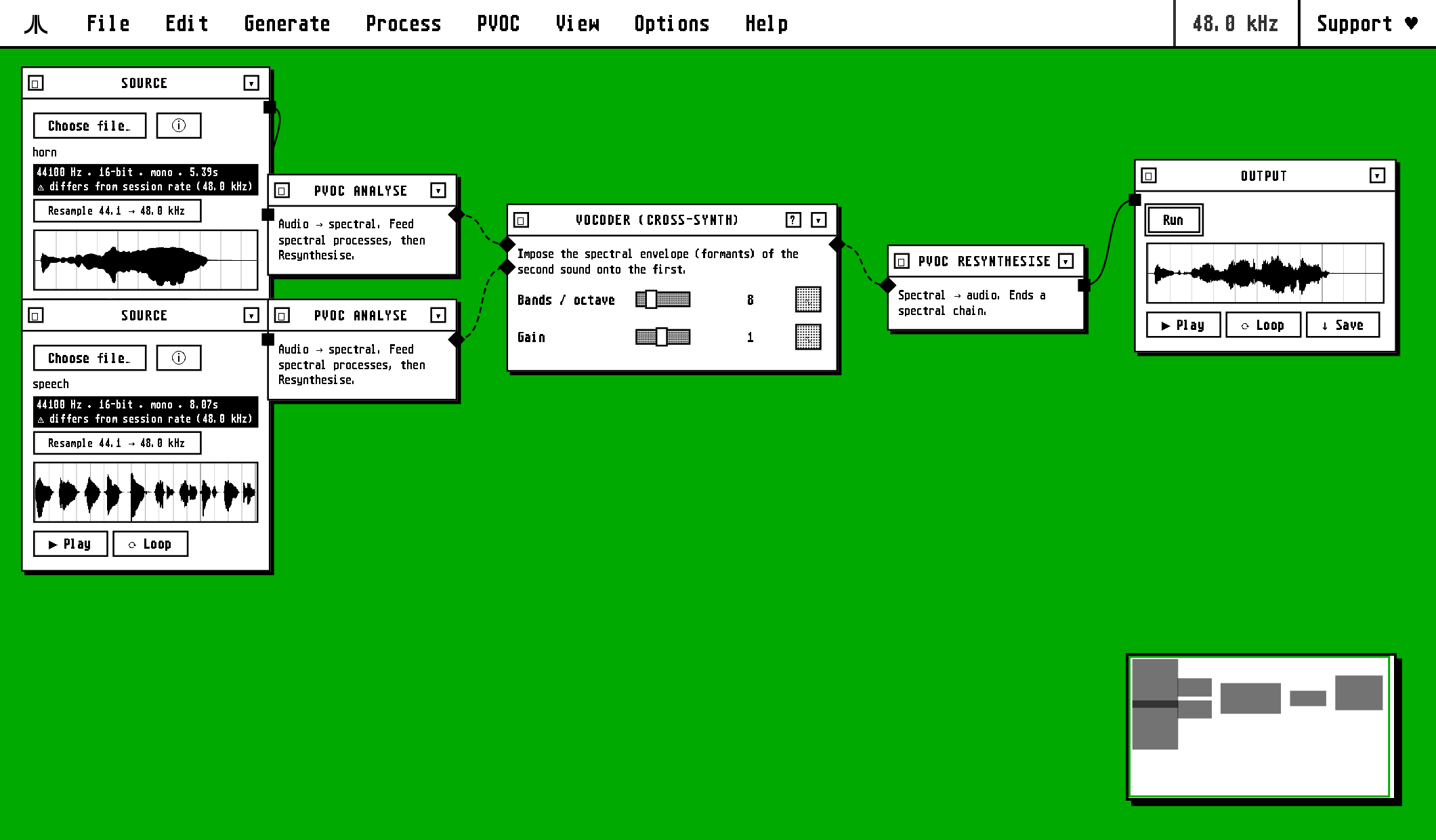
It's an early alpha build - v0.1.0 - there will be bugs, please let me know if you find anything.
Best,
Oli Larkin
(Based in Berlin these days but formerly worked at the University of York Music department where CDP has some origins)
I'm happy to share a new WASM port of CDP and a collection of tools built with it.
https://cdp-wasm-suite.github.io
I am cleaning up the code and will open source the LGPL cdp-wasm source code and CDP8 patches this week (the consumers are all open sourced already)
I have to say using CDP via cross platform WASM via node.js is really great.
I built a retro computing themed node-graph patcher frontend too:
It's an early alpha build - v0.1.0 - there will be bugs, please let me know if you find anything.
Best,
Oli Larkin
(Based in Berlin these days but formerly worked at the University of York Music department where CDP has some origins)
#9
General Board / Re: Problems with MOVE formant...
Last post by Robert Fraser - June 09, 2026, 12:16:10 PMProvisional bugfix is now on Github - see RWDobson post under "Announce".
#10
Announce / Bugfix for program 'specfnu'
Last post by rwdobson - June 08, 2026, 06:25:55 PMSome memory errors which prevented the program running to completion, have been fixed, for specfnu mode 8.
Specfnu handles all the processes under the Soundloom "Voice Box" (speech processing) option.
Revised binaries (zipped) for Mac and Windows are now on Github - look for the folder "BinUpdates/Jun2026" and proceed to the folder for your platform.
( go to github.com/Composersdesktop/CDP8)
Specfnu handles all the processes under the Soundloom "Voice Box" (speech processing) option.
Revised binaries (zipped) for Mac and Windows are now on Github - look for the folder "BinUpdates/Jun2026" and proceed to the folder for your platform.
( go to github.com/Composersdesktop/CDP8)